How I used ChatGPT to split three nights between Tokyo and Taipei


 Reading Time: 4 min
Would you fly all the way from the U.S. to Asia for just three nights? I just did — though flying Japan Airlines first class on its Airbus A350, booked with miles transferred from Capital One, made the decision a little easier.
My plan included Tokyo, my favorite city in the world, and a very quick first visit to Taipei for its night markets and food scene. The challenge was deciding how to split such limited time between them without completely exhausting myself.
After months of debating whether to spend two nights in Tokyo or Taipei, I used ChatGPT to compare the options and help me plan a trip with the right mix of food, exploration, and rest.
Our ultimate travel gear cheat sheet
When our friends ask what to buy before a trip, we don't type out a list — we send one link. The Points Path Amazon Storefront is our team's running cheat sheet of gear worth owning: carry-on essentials, mobile power, long-haul flight comfort, travel tech, smart safety gear, gifts for the person always headed somewhere, and much more. We add as we find things, and pull items when something better shows up. It's never a snapshot of what was good two years ago. So consider this us sending you the link. Bookmark it before your next trip sneaks up.
Shop our editors' picksMy biggest question: How should I divide three nights?
My first idea was to spend one night in Tokyo and two nights in Taipei. I’ve already visited Tokyo twice, while Taipei would be completely new to me. Giving the new destination more time seemed like the obvious choice.
Then I considered doing the opposite: two nights in Tokyo and one night in Taipei. That would give me more time to recover from the long flight, enjoy a city I already know and love, and still experience somewhere new.
I asked ChatGPT to compare both options while accounting for travel time, airport transfers, jet lag, and how much I could realistically do in each city.
What I hadn’t realized when I booked this trip was just how much more compact Taipei is than Tokyo. One night obviously wouldn’t be enough to see everything, but it would give me time to explore part of the city, eat at a night market, and get a feel for the place. Tokyo, on the other hand, is so massive that I could spend months there and still want more time.
In the end, I settled on two nights in Tokyo and one night in Taipei.
The prompts I used to plan my trip
I didn’t just ask ChatGPT for one itinerary and call it a day. I kept adjusting my questions as I figured out what mattered most to me.
Here are a few of the prompts that were most helpful:
- Should I spend one night in Tokyo and two nights in Taipei, or the other way around? Compare both options while considering jet lag, flights, and airport transfer times.
- Build a realistic itinerary around great food and exploring, but leave me enough time to rest.
- Can I actually experience enough of Taipei in one night, or would I spend most of my visit in transit?
- Should I just stay in Tokyo and save Taipei for another trip?
- Which area of Taipei should I stay in to make the most of one night while keeping airport transfers easy?
The answers helped me narrow down my plans and be more realistic about what I could fit in. For Taipei, I told ChatGPT what I wanted to do, including a stop at Raohe Night Market, and had it help me figure out where to stay. I ended up at the Mandarin Oriental. It’s a great hotel, convenient enough for such a short stay, and bookable through Amex Fine Hotels + Resorts, so I could use my $300 semiannual hotel credit.
How AI helped me plan (and eat) without overdoing it
I still do my own research for every trip, spending hours reading articles and asking well-traveled friends for advice. But when I’m stuck between two options, AI helps me think through the pros and cons as I go back and forth.
In this case, it helped me see what was realistic and where I needed to scale back.
Once I landed in Tokyo, I kept using ChatGPT on the fly. I’m a big foodie, and with only a few meals in the city, I didn’t want to waste any of them. One night I asked whether to go out for tonkatsu or just grab a 7-Eleven egg sando, then what to prioritize the next day between ramen and sushi. I also asked for places locals really like that aren’t super touristy and don’t necessarily need a reservation.
How to fit more of your wardrobe into a single carry-on
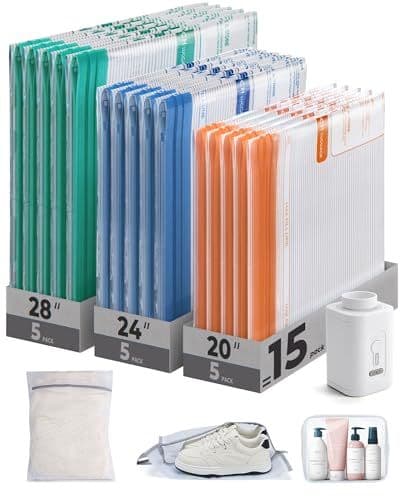
Reclaim up to 50% of your suitcase capacity in 15 seconds. This BAGSMART 18-piece set pairs color-coded compression bags with a cordless, packable, Type-C rechargeable pump that shrinks bulky layers and extra outfits anywhere; no wall outlet required.
Get it at Amazon